BoatFishingNavi
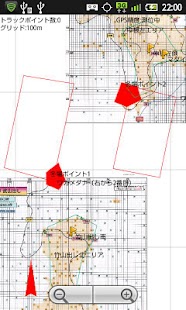
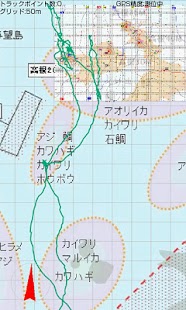
Without connecting 3G, self-made map point data format (kml) andDisplays the position data acquired by GPS.Such as a scanned paper maps and books,As an image overlay on GoogleEarthUsed as a map for GPS can display anything!
For more information on how to use the followinghttp://ameblo.jp/tokyowanturi/entry-10936506504.html
※ GoogleMap display is not possible.GoogleEarth map was created in the PC version of yourselfPlease use registered.
※ Note ※We have developed assuming a fishing-boat.Caused by the use of this applicationLoss or liability for any damage.
android 1.6 or higher
Verifiedau: IS01 android 1.6soft bank: 003SH android 2.2
When used in fishing boats,Settings Smartphone We recommend that you below.
The backlight display Setting is maximum brightness.
Automatic screen orientation switch to OFF.
・Show kml(point and image overlay) file data.
・GPS track log and see
・ Mark the position of the screen you want to mark a temporary * Name record you want to record a point
・ The position information read and display from kml files
・ Track position and point of saving kml format
・ load and display the location and point form kml files
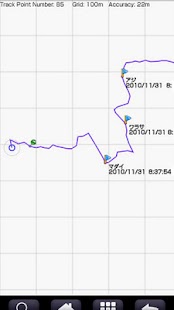
Track Point Number: Displays the number of recording tracks in the position.
The default is limited to 500.
Accuracy: Displays the current GPS measurement accuracy of meters.
○ Blue: current position
□ Red: the start of the measurement
Blue lines: Track
Green pin: the marked position
Blue Flag and character: point location, name, time
Map Clear: loading map (kml file) Clears the display.
Map Read: load kml file from "/sdcard/BoatFishingNavi" and display.
Mark: the green pin, mark the current position.
Point Check: point and recorded the name as the current position Display a blue flag.
Track Clear: to clear the Track Logging.
Track Save: Track saved to a file being recorded for "/sdcard/BoatFishingNavi".
Setting: Perform the following settings.
Track Line Width: the width of lines to display log (1 point, 3 points, 5 points)
kml Line Width: kml file for compensation for the line thickness (x0.5, x1, x2)
Font Size: The size of the font used to display (12 points, 14 points, 16 points)
Grid Size: The size of the grid line (25m,50m,100m,off)
Max Point Number: The maximum number of records that track position (500,1000,2000)
Compass Type ON,OFF,auto screen lotation
Magnetic declination:value of Magnetic declination
Accuracy circle ON/OFF: SwitchAccuracy circle, hidden
Gps Sleep ON / OFF: Switch enable GPS operations in the background / Disable
Edit File Name ON / OFF: Enable or disable editing of the file name.
Edit point Text: Edit the text to be used for point (Point A ~Point H)
When you start, SD cards are the following folders: Will be generated automatically.
/sdcard/BoatFishingNavi
Please if you use a GPS enabled.
About BoatFishingNavi
- Package name (App ID)
- com.tokyowanturi.boatfishingnavi
- Available on
- Google Play
- Price
- Free
- Version
- v1.9.2
- Updated
- May 1, 2014
Looking for the BoatFishingNavi APK?
The safest way to get BoatFishingNavi (com.tokyowanturi.boatfishingnavi) on your Android device is to install it directly from Google Play — you'll always get the latest official version, automatic updates, and no risk of modified or infected APK files from third-party sites.
Social Features
Connect and share with friends and the community.
Gaming Features
Enjoy immersive gaming experience with various game modes.
Weather Features
Get accurate weather forecasts and real-time updates.
See BoatFishingNavi in Action
Frequently Asked Questions
Is BoatFishingNavi free?
Yes, BoatFishingNavi is free to download and install on Android through Google Play.
How do I install BoatFishingNavi on Android?
Open Google Play on your Android phone or tablet, search for BoatFishingNavi or tap the Google Play button on this page, then tap Install. The app downloads and installs automatically.
What is com.tokyowanturi.boatfishingnavi?
com.tokyowanturi.boatfishingnavi is the App ID (package name) of BoatFishingNavi on Google Play. Every Android app has a unique package name, and it is the safest way to verify you are installing the official app.
Is BoatFishingNavi safe to download?
Installing BoatFishingNavi from Google Play is the safest option: you get the official version, verified by Google Play Protect, with automatic updates. Avoid APK files from unofficial third-party sites.
Get BoatFishingNavi Today
BoatFishingNavi for Android — free download on Google Play.
Compatible with Android phones and tablets — available on Google Play.
Ask AI about this app
Get instant answers about features, tips and more from popular AI assistants.